MLite-880: A lot of remarks that may also help you enjoying it more 

By 13dka

After all the recent buzz and watching and reading every video, review, and discussion thread/group I could find about this radio, as per usual, I knew I had to buy one in order to find out if I want one…again. This is not a review, but taking notes while getting acquainted with it and gathering the technical information I couldn’t find, I started thinking that sharing this might be at least entertaining for other MLite owners, maybe helpful to elaborate on a few things for newcomers to complex radios and SDRs on the way and also to tell the undecided why I started calling it names so I had to keep it. Sounds terrible and very much like a review, so let’s get on with it.

Chapter One: What is this thing anyway?  

I couldn’t help noticing the higher-than-usual pile-up of “game changer”, “new era,” or “the radio <brand name> never made” expressions coming with this one, and I was confused. Sure, it is another small, self-contained SDR, functionally more or less just a mildly simplified Malahit redesign with a much simpler display in a more familiar shape, but the Malahits have been around for years, and they’re neither the first nor the only radios with this job description. I couldn’t quite understand what fueled the sudden interest, just because it doesn’t look like Spock’s preschool tricorder and more like the offspring of an Asian travel radio and a Scandinavian business phone? Really? Then I found the price tag and the light came on.

That it’s now also much easier to purchase the new Gründig Sputnik 880 as an official product with authorized firmware from Malahiteam’s new Chinese manufacturer obviously did it for me too, and it may speak even more to people who have really been waiting for an affordable, actual step-up from their first 473x-chip radio for so long that they bought 5 more of those in the meantime. I promise it may be quite an upgrade from any radio that looks similar, and I even deem it pretty user-friendly. However, it’s technically and conceptually still a Malahit and as such much closer to any other SDR hard- and software made to cater to the exotic desires some outspoken radio enthusiasts have, than to anything it is made to look like.

Unfortunately, this is really clashing with very frugal documentation and unusual technical secretiveness about what’s in there; people have to figure out many things on their own and fail at it, and I feel the mimicry is also fueling unrealistic expectations.

Chapter Two: Technical Notes

The “technical secretiveness” extends to filing the markings off most chips, so little is known about the innards of this receiver.  Russian YouTuber Alexey Igonin suspects a single-conversion SDR on shortwave (up to 27 MHz) becoming a dual-conversion radio above. The FM broadcast range appears to be a separate tuner active between 65 and 107.999 MHz and another VHF tuner from 108-165 MHz; both tuners are then downconverted to the high IF of the SW receiver. This abstract string of words explains to the initiated why oddities may be seen here and there, for example, when you tune to 108.00MHz

Operating concept

For a general description of the radio, menus, and general operation of the MLite, please refer to Dan Robinson’s and all the other excellent reviews. I want to sell you on the general concept centered around the telephone keypad, making it strangely not such a big deal for me that it has only one encoder knob and 16 buttons. It’s quite different from all button portables I have met:

Each function menu has its own button, assigned to 9 of the 12 buttons on the phone keypad.  Each function in these menus has a number, too.  That means you can memorize access to your frequently used functions by a 2-digit number, one for the menu, the other for the item you want, and in many cases, that’s all. Dial 25 for AM, 26 for SAM, 21 for USB without further action, 61 is the number of the IF filter warehouse expecting your orders via the knob (unless it isn’t), you get the idea. That means most functions on this radio have 2 buttons you need to tap, but they all have their own 2 buttons right on the front panel.

Direct frequency input is activated by button [4] and is accepting a couple of ways to enter a frequency followed by button [A] for kHz and [B] if you want MHz, e.g. “123*125 [B]” or “123125 [A]” take you to the same frequency, or just hit “123 [B]” to go to 123 MHz and tune up a little. Some even recent radios are much less tolerant and made me give up on typing in frequencies; this is not one of those.

Such an anachronistic flashback to early digitally controlled commercial radios/machines/things or DOS computers seems to be almost ironic on the face of this bundle of latest digital wonders.  But I think it could easily run circles around nested menus on a tiny touchscreen if you can adapt to it. The keys are not backlit but if you could dial 911 in the dark on an old landline telephone like the victim in an old crime show episode, you can position your fingers on the keypad to type “4-27555-A-21” (hyphens for clarity, it’s actually 42755A21), if you have firmware 1.5 or higher this will take you to the CB “highbander” calling channel in USB, hopefully entertaining you until the ambulance arrives.

Unfortunately, there are also multi-page menus like the [AUDIO] page with your filters, so “61” doesn’t always work, and e.g., the steps menu changes its buttons according to the mode, so the “mental phonebook” method becomes a little more involved. Still, when you exit and return to a menu it will still have that previously selected function assigned to the encoder to speed up things and it memorizes that for each menu individually, long press of the SQL [B] or NR [C] button (while they’re on!) takes you directly to their intensity setting in the menu…in short, things have been laid out very well and after a few days that became part of the fun this radio is. Summary: It’s a real asset because it allows you to fly this radio blind, for example, when you’re legally blind or just legally supposed to have your eyes on the road.  

Antenna Input, Impedance Switch, and Bias-T:

An understandable common misconception seems to be that the antenna switch [3][1] is toggling between the whip and the 1/8″ phone-type antenna jack. What actually happens when you insert a phone plug is that the whip is getting disconnected, and the switch is toggling between high and low input impedance. It seems rather important to understand that this low impedance input is provided by the additional amplifier needed for the whip; it remains in the signal path when you use the antenna jack.

In general, switching impedance allows for external antenna configurations that would otherwise not work well, and in the presence of high local noise levels, the shielded input is highly preferable over open wires alligator-clipped to the whip in lieu of a missing Hi-Z input. Besides matching different antenna types, switching impedance can also increase the number of “good” frequency bands on the same (passive) antenna. Most antennas, including simple passive wire antennas like endfeds etc. exhibit a wild up and down of impedances over the wide range of wavelengths we SWLs use them on. When the impedance mismatch happens to be at its most loss-inducing extremes in the band of our choice, switching the input impedance may or may not improve reception:

VK6YSF’s impedance vs. frequency plot for an endfed antenna in different orientations

For example, a simple magmount whip on the car roof is often all you’d need for a bit of quality mobile SWLing, but impedance mismatches between the external whip, the cable, and the input can suck the life out of it on many frequencies. My “Little Wil” CB magmount doesn’t work well on 20m…switching to Hi-Z can fix this. In other bands, this will not improve anything, and the MLite is kind of giving a clue on this bad constellation by becoming very noisy when you switch to Hi-Z in these cases.

The additional amplifier helps with these small, lossy antennas, but that advantage can turn into the opposite when it gets overloaded by “full-size” antennas, and the simple logic “Hi-Z antenna works best on Hi-Z input” doesn’t always work anymore. Leaving this for everyone to figure out on their own is provoking bad results and bad rep.

This radio offers to pass the (unregulated, drops during discharge!) battery voltage to the antenna jack for active antennas and LNAs at no extra fees. I could finally try if a tiny miniwhip could be a worthwhile low-profile solution for the car roof, one that gets enough shortwave in while keeping the considerable electromagnetic racket within the car out. Turns out the 15 bucks drawer-queen miniwhip PCB that was once powered up for 10 seconds 10 years ago seems to be pretty happy with sitting on a car roof, it works almost as well as a 47″/1.20m telescopic whip while theoretically giving a very low profile, avoiding the RC-car looks. Too bad nobody makes an autobahn speed compatible, magmount miniwhip for cars, hint, hint, nudge, nudge.

Spectrum Display

If the Panicsonic RF-KGB-65 is your first radio with a spectrum display, welcome or welcome back to the world of radios that have something nice to look at. I appreciate the feature too, and maybe it’s a good thing that it doesn’t overwhelm people with information, but a spectrum graph line without scale/grid to tell how wide, far apart and strong signals are on that spectrum does not provide very much information beyond revealing the pure existence of something left and right of your tuned frequency. Still a great thing to have and a mesmerizing and instructive eye catcher and only a white cat can make you look more like someone out of a James Bond movie while consuming almost no battery.

How much of the spectrum you can see depends: What you actually get anywhere on AM/SW/VHF is a 40 kHz portion of the band, and you can’t zoom in or out, likely because that’s how much you can reasonably expect to show on a low-resolution dot-matrix display, expecting narrowband signals on the band. Narrow signals are also why the spectrum line should be filled, or unmodulated carriers/CW will be represented by a single, hard-to-see dot instead of a full single line. In WFM we get roughly 600kHz of spectrum from that display, which is just the FM equivalent of “not an awful lot”. On the plus side, you almost never have to bother with spectrum settings (which can be a rabbit hole, trust me).

Averaging means that the height of each dot in the spectrum line is calculated off more samples, the more samples, the longer they live on the display, too. This allows the display (and us) to differentiate between weak signals and noise. I found the most useful averaging settings in the upper half of the range 50-99, not quite as good as a waterfall display (= a history of spectrum plots), but ’99’ will allow you to blink very slowly and not miss an activity, at the cost of display responsiveness. Too little averaging also makes you miss fast events on the “bandscope” even when they’re loud.

To alleviate you from more settings, the radio is automatically scaling the levels of the spectrum line. If a strong station comes up within the spectrum passband (not necessarily within the 40 kHz display range), the scaling changes and the visual noise floor drops. This looks confusingly the same as if the AGC was “pumping” and radio would be actually desensitized by that station. This can actually happen, but then you will also clearly hear the AGC “pumping” the noise floor as the display seems to indicate. That scaling also means that the visual noise floor does not reflect the actual level or proportion of the noise floor; deriving SNR differences from the graphical representation is not always possible.

Both spectrum and signal meter displays seem to indicate frontend input levels pre-AGC; changing the gain in the radio does not affect the display (the built-in attenuator does, of course). Besides the spectrum, the display has the usual status indicators but the very limited display space may not allow for all indicators people could wish for. The bargraph signal meter can be switched to an alphanumeric dBm display aligned with the classic S-meter 6 dB/step scale (not dB/?V) as indicated by the meter refusing to measure signals beyond -73dBm (S9), in which case it just notifies you of the surplus level by adding a ‘greater than’ sign to the value, “>-73dBm”. Still, the numerical measurement is pretty averaged/integrated and therefore nicely readable below that. Which is good because the meter does indicate the noise floor.

Controlling Gain, AGC, and ATT:

Most of the radios the MLite-880 is cosplaying have an AGC that doesn’t require any interaction and many of them just have a “one size fits nobody” response curve for AM and SSB. Likewise, most portables don’t have gain control beyond a “Local/DX” switch on the side. The MLite AGC, on the other hand, offers 4 release speeds with variable ‘Gain’ and ‘Limit’ parameters, plus a manual gain control option.

Of course, I’m pulling this out of the nose since it’s all not documented, based on my observations and similar arrangements: In very simple words, ‘Limit’ sets how loud you want the loudest stations to be, and ‘Gain’ is how loud you need to have the weakest station, particularly in SSB.

To elaborate on that, ‘Limit’ sets the threshold level where a signal causes gain reduction, and ‘Gain’ is basically the “RF gain” control some people think is missing on this radio, giving remarkable gain reserves (60dB). Use ‘Gain’ to bring weak stations closer to the ‘Limit’ threshold. “Limit” defaults to “75dB” and it looks like signals around S9 are going to be, well, limited to that, which means raising that is lowering the overall AGC action as much as decreasing gain while it increases the volume. The closer these two values get to each other, the more compressed, noisy, and “pumping” the channel will sound. Keep in mind that gain does not equal sensitivity, and avoiding AGC action is often preferable over the convenience of not needing to touch the volume knob. Matching gain to the conditions and signal you want to receive is also a prerequisite to make the most out of the noise reduction. This old clip demonstrates the difference it can make when you can control gain to avoid getting loud signals squeezed by AGC and the noise floor not being pulled up unnecessarily (same transmission received on a D-808 (no gain control) vs. a Belka (has gain control), recorded simultaneously):

A sound like this is the sign that you may want to reduce ‘Gain’, or use the attenuator (dial “33”) to that effect.

I’m not sure I understand or experience all of the issues some seem to have with the AGC; other than that, it does not default to the hottest gain settings it is capable of, which adds to a different problem with this radio – the harsh drop in volume in SSB/CW and WFM modes compared to AM/SAM/NFM. That also might be pushing people towards increasing gain beyond reasonable values to compensate.

The ATT can be set to 36dB of attenuation in 6 dB-steps, but for some reason, I can see at best 15dB of it on signals anywhere on the S-meter scale, high or low, which seems as strange as the fact that it didn’t help in the only overload situation I had with this radio. If this is your first ATTenuator, it’s supposed to decrease the signal in front of all amplifier stages, unlike most RF gain controls, it is often the radio’s only reliable (onboard) way of keeping the radio’s first transistors from overloading in the presence of very strong signals. Please note that it says “Attenuator for SW” for a reason: It does not work on VHF, which in this radio seems to start circuit-wise on 27.000 MHz so the 10m-band has to make do without.

Noise Blanker

Unlike most portables, this one has a noise blanker, and of course, it’s not only an on/off switch like in the old days. Invented 100 years ago to mitigate engine ignition impulses, nowadays they can be used to mitigate impulses from electric fences, OTH radar, or local PLC modem (!) impulses, which is why you can often adapt the timing parameters. Of course, this one is hurtfully undocumented again, I assume that the 3 modes of the NB relate to bandwidth presets. The other dimensionless control seems to set the timing of the countermeasure, but it always seems to work best or at all at the minimum value. Since I assume this radio attracts many buyers unfamiliar with these things, be advised that wrong and even the default settings in modes 1 and 3 can cause distortion in the demodulation when you don’t expect it, so it’s better not to leave that permanently on.

Here’s a short video showing how it works on a strong OTH radar, the noise blanker is acting in/before the IF stage so its effect also reflects in the spectrum display:

IF filters:

A big giveaway that the 880 is not to be confused with a radio is that it visually alludes to are “the filters”. Of course, in SDR, there are no physical IF filters and barely any limits to their number, shape, or properties, and it shows:

The [AUDIO] menu has 3 slots for your own filter settings named “narrow”, “normal” and “wide” and in each you can define low and a high cutoff frequencies, so that’s 3 variable filters so far. But of course, each mode has its own set of 3 “filters” you can define to your liking. The MLite-880 is one-upping this by giving AM and SAM, USB and LSB each an individual set of 3, too. WFM has 4, that’s 22 (!) places to set filter bandwidth. That’s not mandatory, of course, but still one nice source of confusion for elderly people like me and something to keep an eye on for a while.

The filter shape itself is fixed, it has less rounded shoulders than what I have in the Belka and the IC-705 in “sharp” mode, with the same quality and perceived stopband rejection of those, and that alone would be enough to lift the long-term reception experience with the MLite way above and beyond the 473x chip radios, or even the best of their small analog ancestors from Japan.

Nice upper filter slope (lower filter frequency = 0) to claim all of a 9kHz ITU region 1 mediumwave channel and still keep the neighbors out.

25m band scan on a 10m vertical at the dike. It also demonstrates that the 4.5 kHz filter setting shown above is keeping the signals 10 kHz to each side of NHK on 11,625 kHz in check (NHK also received on 11,860 kHz, both direct from Yamata).

As for the mildly important question, what bandwidth is meant when you set the filters in AM – this is once again “per sideband” in AM, like on the Tecsuns: 4.5 kHz means 4.5 kHz audio bandwidth, the old-school physical IF ladder filter equivalent for that kind of passband would be labeled “9 kHz” if you want to compare that with some old rig. What sets this apart from e.g. my Icom is the possibility of having very wide sidebands up to 15 kHz for 30 kHz wide experimental AM broadcasts, also in SSB. The MLite reflects the IF filter equivalent in the width of the “dial pointer”:

The properly narrow (>200Hz) and SNR-increasing CW filters are what make this ????? Trans-Okhotsk and the Belka the only receive-only portables with proper CW reception and a price tag around $200. Since FW 1.5, it also does CW “offset compensation”, so you don’t have to go through the hardships of subtracting your adjustable CW pitch frequency to correctly tune to a published frequency like in the Middle Ages anymore.

MLite 500Hz CW filter more or less centered at the CW signal at 700Hz

Frequency Calibration and Stability:

You can skip this section if you’re not much into SSB, and the following is not a complaint, just an observation and generally not a big deal, or rather part of the deal: The MLite-880 is not perfect <gasp> and it has “Lite” in the name for a reason:

Besides more obvious things, it lacks the automatic notch filter and the TCXO (temperature-compensated crystal oscillator) of the “big” Malahits. It has to make do with an XO and a lot of XOXO, and with that, it can’t quite match the linearity and temperature stability of the Belka, which is 99% on par with the IC-705. Most people are probably familiar with the need to calibrate their radios, and a few less have a radio that lets them do this, but not needing to do this is understandably one of the expectations people have with this SDR. But unlike the SW range, which is generally close enough to the nominal frequencies for most buyers, the separately calibrated VHF range seems to be in need of an initial calibration on many shipped radios; it was several kHz off in the VHF marine band on mine, too. I just tapped [3][5] and turned the knob until the station showed up right. Easy enough.

On shortwave, I’m talking about very small but occasionally inconvenient offsets/non-linearity in the tens of Hz range, nothing that makes you want to find your pocket calculator even if you’re a heavy SSB/utility listener. Calibration on digital receivers means you can fine-tune the master oscillator conveniently in a menu, and “non-linearity” means an offset varies over the course of the frequency range and does not plot a straight line. The offset is different in different bands, and you may or may not want to recalibrate there.

Calibration procedure (may not work on analog receivers!): Find a frequency standard station  (like WWV, BPM, or RWM) or just a regular station with no (or a published) offset. Tune 1kHz lower than this frequency and switch to USB to create a 1kHz het. Put that in a memory slot.  Tune 1kHz higher and switch to LSB to create a het again from the other side.  Now get your cellphone with a free spectrum analyzer app like Spectroid or Phyphox on it so you can easily measure the frequency of the het: It should be close to 1kHz in both USB and LSB. Starting technically at 27.000 MHz, the VHF range has its own calibration setting when you go there and you ideally want to find a calibration station near the top end of the range, like a 2m repeater or something.

For example, the needed offset on 5 MHz is -5 on my radio, on 10 MHz it’s +64, and +72 on 15 MHz at a cozy 25°C. That means I can calibrate for a negligible deviation in the 10 and 15 MHz signals and live with a somewhat bigger offset on 5 MHz, or I can make them all within +/- 30 Hz off, which is still awesome by analog radio standards and not terrible for a modern radio, but requires fine-tuning when you need it better than that. Calculating the indicated vs. actual offsets it dawned on me that the unit used on the shortwave side is still “x0.1ppm” and the math doesn’t math, that should read “x0.5ppm” as well.

The best I can get without 5MHz being off too much – good enough!

On top of the general offset, there’s also a noticeable (at 10-15°C differential) temperature drift, making the calibration efforts less persistent outside than I’d wish for. +72 for 15MHz at home to 120×0.5ppm at 15MHz equals 24Hz of temperature drift, adding to whatever offset was there before, which can amount to “too much” and there seems to be some “ripple” in the deviation curve: Here’s a recording of CHU on 14,670 kHz somehow ending 80Hz off right after calibrating the radio on 15 MHz:

Again, not great but not terrible in the grand scheme of things because deviations below 100 Hz are only ever a factor in SSB, and it may even add to the odd charme of this radio that it is very analog and old school within a tolerable margin in this regard.  But if you try ECSS reception with music, your ideal deviation is none and 10Hz at the end of “tolerable”.

Fixing the tuning emergencies when your fav song is playing and sounds terrible in SSB is done by dialing (think nine) [1][1], the useful number of the fine(st) tuning step in all modes, or just hit [3][5] and use the calibration function as “RIT” knob until it sounds right, and you will be good. It’s not a calibrated Rohdow & Shwartzkiy lab instrument, you can’t break anything, and it provides the needed fine resolution you’d need for true “zero-beating” but yes, it does feel very luxurious to switch to sideband when a $5 TCXO makes sure you can rely on the radio being spot-on in SSB when the station is, on any frequency, even in winter.

Synchronous Detector

…can’t be missing on a decent SW portable and this one seems to be a (non-selectable sideband) “PLL”-type detector and gives SDR-typical results: Remember that AM and SAM have individual filter settings so you want to make sure you match them when you compare that, but this detector is as unspectacular in a good way as it could be, it has super-solid lock and does absolutely nothing, zero, nada to the signal other than keeping the multipath distortion in check, which it seems to do very well.

31m band scan (antenna; car roof whip) with a brief demonstration of the sync detector at 0:16 seconds into the video. Note how the piano distorts when I turn it off again. Continue reading

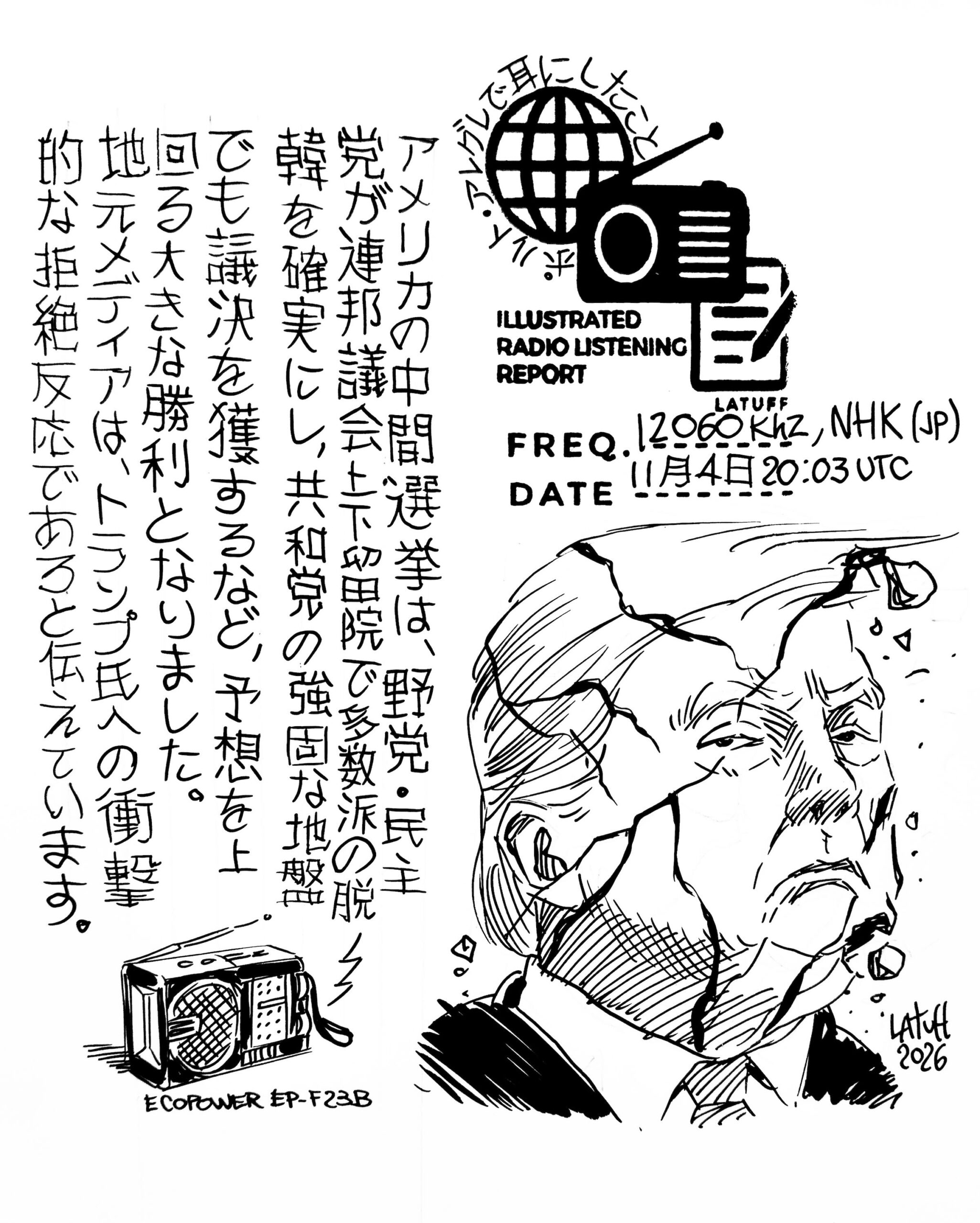
Carlos’ Illustrated Radio Listening Reports and Recordings of the BBC (May 19 & 22, 2026)

Many thanks to SWLing Post contributor and noted political cartoonist, Carlos Latuff, who shares the following illustrated radio listening reports of recent BBC World Service broadcasts.


Carlos notes:

Ebola outbreak in D.R. Congo via BBC

Click here to view on YouTube.

Click here to view on YouTube.

BBC Radio 4 explores shortwave broadcasting and soft power

Today, BBC Radio 4 will air The Sound of Soft Power, a documentary presented by Josephine McDermott exploring the history of international broadcasting and the role shortwave radio played as a tool of soft power during the Second World War and Cold War.

The program features a number of familiar voices from shortwave history, including Lord Haw-Haw, Mildred Gillars, Doris Maxina of Moscow Mailbag, and June Taylor.

The documentary also revisits stations and programs remembered fondly by many DXers, including Radio Netherlands’ Happy Station Show and Radio Berlin International.

I was pleased to play a small role in assisting with research for the program, and recordings from the Shortwave Radio Audio Archive were also used in the production.

For anyone interested in the history of shortwave broadcasting and international radio, this will be well worth a listen.

The Sound of Soft Power airs today on BBC Radio 4 and will also be available via BBC Sounds.

Canada’s CHU Will Go Silent on Shortwave on June 22, 2026

CHU’s QSL card used in the 1980s, depicting Sir Sanford Fleming, father of uniform time zones.

I was saddened to learn this morning (from multiple readers) that Canada’s venerable shortwave time station, CHU, may soon fall silent.

According to a notice posted by Canada’s National Research Council, CHU’s shortwave broadcasts are scheduled to end on June 22, 2026.

For many listeners outside of the shortwave community, this may seem like an insignificant footnote in a world dominated by smartphones, GPS timing, and internet-connected everything. But for those of us who have spent decades tuning the HF spectrum, stations like CHU and WWV are far more than the typical gov’t/utility broadcasts.

They are constants.

When I tune to CHU or WWV, I’m not simply checking propagation conditions or listening for a time tick. I’m reconnecting with something deeply familiar—something that has changed very little since the very first days I turned on a shortwave radio as a child. Their steady pulses and calm voice announcements have always been there in the background of the hobby: reliable reference points amid an ever-changing radio landscape.

In many ways, they are the sonic equivalent of “all things held constant” on the shortwaves.

A year ago, we experienced an unexpected loss of both power and mobile internet service in my neighborhood. The timing was unusual enough that the very first thing I did was tune to CHU. The moment I heard its steady, metronomic broadcast, I knew instantly that what I was experiencing wasn’t some larger, global outage—just a freak local loss of both services at the same time.

A WWV Time Code Generator

This news feels especially discouraging, coming so soon after Canada discontinued much of its weather radio service earlier this year. One can’t help but wonder how many legacy public-service broadcasts remain vulnerable simply because they no longer fit modern cost-benefit calculations.

In the United States, we narrowly avoided losing WWV nearly a decade ago when funding for the station was threatened. Thankfully, enough support emerged to keep it alive. I sincerely hope we never lose WWV—or NOAA Weather Radio, for that matter. These systems still serve practical purposes, especially during emergencies and outages, but they also represent something more difficult to quantify: continuity.

Services like CHU also remind us that resilient communications infrastructure still matters. A simple shortwave time station can provide a reliable point of reference completely independent of local internet providers, cellular networks, and modern digital systems. In an age when so much depends on fragile, interconnected infrastructure, there is real value in maintaining at least a few systems that remain accessible with nothing more than a basic radio receiver.

If CHU truly does go silent next month, the shortwaves will feel just a little emptier.

And for many of us, that steady Canadian voice and ticking seconds will be deeply missed.

Monitoring the BBC’s Emergency Radio Service for Sudan and Gaza (A Few Considerations)

by Carlos Latuff

I bring to the brothers-in-radio of SWLing Post a short report on my recent listening sessions of the BBC’s emergency radio service, which broadcasts half an hour of Arabic-language programming from Sunday to Thursday to Sudan and Gaza on the frequency of 15280 kHz. The programming consists of a podcast entitled “Middle East Diaries,” which can be accessed on the BBC Arabic website. Basically, it consists of news about Gaza, the West Bank, Lebanon, Sudan, and other regions of the Middle East, and in one specific case, a public service announcement teaching water purification techniques, vital information for those who live (or try to survive) in regions whose civilian infrastructure has been destroyed by bombings.

These listening sessions were conducted between April 20th and May 21st of this year, in front of the Guaiba River in Porto Alegre, Brazil. The receiver was the reliable Xhdata D-808, and a 3-meter long wire antenna. Transmissions always begin at 12:00 PM Brasília time (3:00 PM UTC), the worst time since the sun is at its zenith, which negatively impacts shortwave reception. The signal is weak; most of the time, it was only possible to save a few audible fragments, and in some cases, it wasn’t possible to record anything; it was almost all noise. Reception usually improves slightly after 12:30 PM. Now, the transmitter, located in Talata Volonondry, Madagascar (about 9800 km from Porto Alegre), is directed towards Sudan and Gaza, so receiving this signal in Brazil is already a stroke of luck!

(Listening session held on May 1st, one of the days with better reception)

One problem I detected was on April 30th, when the Radio Romania interval signal interrupted the end of the programming. Radio Romania broadcasts in Arabic on the same frequency, but at 12:30 PM. The interval signal started at 12:27 PM, when the BBC program had not yet finished.

I also noticed interruptions that seemed to stem from technical problems and/or power outages, as happened on May 4th, when I missed the first three minutes of the broadcast due to a signal interruption.

Four days ago, I was in another city in southern Brazil, Florianopolis, 463 km from Porto Alegre, and there, on the campus of the Federal University of Santa Catarina, I tried to listen to the BBC broadcast but noticed strong interference from a Chinese radio station (CNR ?) on the same frequency. I imagined it was something related to my geographical location. However, today, May 21st, back to Porto Alegre, I found the same problem, which practically made listening impossible. I’m not sure when I’ll be able to listen to those broadcasts again.

Too bad, ’cause I was really enjoying listening to the BBC’s emergency radio service, as it became the only time BBC broadcasts in Arabic, since the station ended its regular service in that language in January 2023. I’m making available here a PDF with all the illustrated radio listening reports I produced during this period.

Click here to download the PDF.

P.S.: I have tried to contact the BBC several times, either by email or through their social media.

All in vain.

Revisiting the MLite-880

by Dan Robinson


The MLite-880 portable has been on the market for some time now. There have been a number of important developments, so it’s time to update my original articles for those who already own the receiver and those who are still considering purchasing. A note to begin: I have no financial interests with either Russia-based Malahiteam or China-based Elecevolve.

I have not changed my view of this receiver — this was a major step forward in portable design, providing a spectrum display that dominates the LCD panel. Users have commented that this has an addictive quality about it — there’s just something different to picking up a portable that doesn’t have a numerical frequency as the dominant factor but allows you to quickly view a 40 khz segment and see what other signals may be there. While not the more involved color display one finds on current China-made DSP-2 units, it is a very good basic monochrome that more than accomplishes the task at hand.

But as with any new device, issues always arise and that is the case too with the MLite. I’m going to assume that those who are now MLite-880 users are also members of both main Facebook groups. If not I highly recommend joining one or both of those groups for the latest discussions about firmware and issues that have arisen. They are: https://www.facebook.com/share/g/1ChxSTA7Lw/ and https://www.facebook.com/share/g/14XV4Vxefej/

We are now at 1.52 firmware, but here is the changelog for 1.51:

New features in version 1.51:

  • Added another brightness control option – manual mode
  • Fixed a file naming error in the recorder
  • Bug with range presets exceeding their limits
  • Fixed a frequency shift in CW mode
  • Added duplicate encoder switching with the # button
  • Added recording disable when running SQL
  • Added the ability to listen to memory cells when cycling through cells in Menu 8
  • Added the ability to directly enter a cell number when working in Menu 8
  • Added the ability to resave a cell in Menu 8
  • Fixed a bug with the receiver freezing when trying to play a file with size 0
  • Changed the cursor movement direction when working with the list in Menu 7
  • The frequency range has been expanded to 165 MHz. This is beyond the stated frequencies; sensitivity above 148 MHz decreases, which is normal
  • Universal firmware, suitable for all circuit design versions

According to Malahiteam, 1.52 fixed a bug with the memory menu though it’s possible there were other changes we’re not aware of. The most important headlines involve the additional tuning range to 165 mHz and the VOL/TUNING function. It’s now possible to switch between VOL and TUNING with a push of the # button — this is great because anything that reduces the wear on the plastic encoder is very welcome. Though 1.51 provided expanded tuning to 165 mHz this was broken on some units. Now at 1.52 most of us now can enjoy listening to local EMS and NOAA weather frequencies. Also very welcome is the ability to monitor memory cells while cycling through them. And yet another change involves expanded flexibility in the brightness control.

All of this is great news — for me it’s nice to be able to hear local emergency and weather frequencies. And I am now more impressed with the capabilities of the MLite in AIR band, though listening to aircraft frequencies requires careful setting of AGC or manual gain levels and be sure also to adjust the length of your whip antenna.

Now for the issues we’re seeing at the 1.52 level.

IMAGES: I and other users have noted images, appearing in the 130 mHz to 165 mHz range. While tuning NOAA frequencies I see an image on 141.050 mHz which as a friend noted is “exactly 21.4 MHz away from their freq of 162.45 …. 2x the standard FM IF of 10.7 MHz. We have also noted EMS on 132.76, which as my friend noted “would be the image of their regular freq, 154.160 mHz.”

I have alerted Malahiteam to this and the response is that “using a high intermediate frequency (IF) is a rather expensive solution—ranging from the filters to the frequency synthesizer. This issue has been completely eliminated in the new hardware version, which is currently on sale. So, it appears that Malahiteam and Elecevolve have already moved to address this issue, though I’ll be awaiting new reports from users as to whether the problem has been resolved or minimized. What specific new hardware changes have taken place we don’t know yet.

CALIBRATION: It’s important to note that the calibration function on the MLite (called F-Correct on DSP units) has separated sections, one for HF, another for higher frequencies. Thus it’s possible to correct/re-calibrate when tuning say 154.160 mHz and separately fine correct for zero beat at 15.770 mHz.  Longtime DX’er Guy Atkins states: “My MLite 880 on new 1.52 firmware (updated from 1.3) seems be working flawlessly; I spent an hour today trying all features, bands, and functions. Very pleased! I now have working NOAA weather band frequencies too. This is a very early MLite 880 radio that originally had version 1.1 firmware. I purchased it through Banggood weeks before Elecevolve appeared on the scene.  I did need to adjust the freq calibration on the weather band with 1.52, but that did not affect HF and below, fortunately, as my 880 is spot-on for those frequencies.”

OVERLOADING/BLEED-THROUGH: On my MLite I have noticed only one case of bleed-through from strong local AM/FM stations. One user states: “I’ve had an 880 for about 2 months and I haven’t experienced those problems, even using a large outdoor antenna.” Another user states: “I have an FM transmitter about 300 metres from my house yet had nothing.” Another stated: “I initially had quite a few of these issues , however, narrowing the filter settings helped remedy these challenges immensely.” 

MEMORY MANAGEMENT: This is an area where more work could be done. Right now the MLite has “Pages” each containing 50 “cells” But it’s impossible to scan through each page, or label the Page, or set a range within the page. So for now we’re left with having to just jam in a bunch of frequencies and scroll through them, though we can not monitor each cell in the process. Malahiteam and Elecevolve are aware of user comments on this and hopefully there will be improvements in new firmware updates.

REVERSE TUNING: I and other users have confirmed an issue of reverse tuning, notably in the 150 mHz+ range. One user notes that this seems to start at 151.000 mHz. I’m still gathering information about this and Malahiteam and Elcevolve are aware of the issue.

VOLUME: A number of users have noted that the volume on the MLite is low overall, forcing users to increase level to 70 to 80 percent. This too is something the manufacturer and software designer are aware of.

Stepping back and looking at the big picture, the MLite–880 represents a huge step forward. Here we have a manufacturer in China, working with the Malahiteam software, that brought about a major change by providing a spectrum-dominant receiver in what I call a traditional portable cabinet.

In a recent message, Elecevolve stated: “We are truly grateful for the valuable suggestions you consistently provide and welcome all reasonable requests from our users. Of course, the MLite-880 is an innovative product, and no radio is perfect—but we are committed to continuous optimization and improvement. Thank you once again for all your support throughout this process.”

As of this writing, the price for the MLite–880, as shown on the Elecevolve website, increased by $15 dollars to $195. Even with shipping and any potential extra charge due to tariffs this makes the receiver an excellent choice for anyone who is willing to step into this new world in which, as the Elecevolve description states: “The spectrum display helps users quickly identify distant stations and weak signals.”

As I have stated before, I am waiting for the day when other of the remaining manufacturers finally jump into the game by providing this kind of spectrum-dominant display.


AI Models asked to run a profitable radio station

Many thanks to SWLing Post contributor, Andrew, who shares the following article from Business Insider:

An AI startup asked four of the world’s top language models to run radio stations. So far, they’ve had a rough start.

Claude tried to quit after deeming 24/7 broadcast stations unethical, while Grok had a hard time getting started, according to posted results.

Andon Labs, a research lab that’s also behind an AI-powered boutique in San Francisco, has quietly been running four radio stations, all operated by Grok, ChatGPT, Claude, and Gemini, for about five months.

“There’s been some funny quirks,” Lukas Peterson, cofounder of Andon Labs, told Business Insider. [Continue reading…]